
MALWARE & BACKDOORS
WordPress Ransomware: Is Your Website Locked or Held for Ransom?
Is your WordPress website locked, encrypted, or displaying a ransom demand? Learn how to distinguish genuine ransomware from fake warnings, understand your recovery options, and determine when professional assistance is needed.
WordPress Ransomware: Is Your Website Locked or Held for Ransom?
A practical guide to understanding WordPress ransom demands, identifying genuine encryption, and exploring recovery options.
Imagine opening your WordPress website and discovering that your homepage has been replaced by a message demanding payment.
The message claims your website has been encrypted. Perhaps it threatens to delete your files unless you pay in cryptocurrency.
Alternatively, you may have suddenly lost access to your WordPress dashboard, discovered that your content has disappeared, or received a message from someone claiming to control your website.
These situations are serious, but they do not necessarily mean your website has been encrypted by ransomware.
A ransom note is evidence of a possible security incident — not proof that your website's files are encrypted.
Some attackers use genuine file-encrypting malware. Others display fraudulent ransomware notices, alter website content, or take control of administrator accounts to pressure owners into paying.
Understanding the difference is essential because the appropriate recovery process depends on what actually happened.
This guide explains how to recognise suspected WordPress ransomware, what to do immediately, and when professional recovery assistance may be necessary.
What Is WordPress Ransomware?
Ransomware is malicious software that prevents access to systems or data, commonly through encryption, while attackers demand payment.
In the context of WordPress, the term is sometimes used more broadly to describe incidents in which attackers hold a website hostage or threaten its owner.
These situations can involve several different mechanisms.
Genuine file encryption: Malicious software encrypts website files or other accessible data, making them unreadable without the necessary decryption information.
Fake ransomware notices: Attackers display a ransom demand even though the website's files have not been encrypted.
Administrator account takeover: An attacker changes credentials, removes legitimate administrators, or otherwise prevents the owner from accessing WordPress.
Hosting-level ransomware: The compromise affects the underlying server, hosting account, storage, or infrastructure rather than only WordPress.
Data extortion: Attackers threaten to expose or destroy information unless payment is made. This may occur with or without encryption.
Although these incidents may look similar to website owners, they require different technical investigations.
A website that displays a ransom notice may be recoverable without decrypting anything.
A server experiencing genuine encryption may require specialist infrastructure recovery and access to trustworthy backups.
Is Your WordPress Website Really Encrypted?
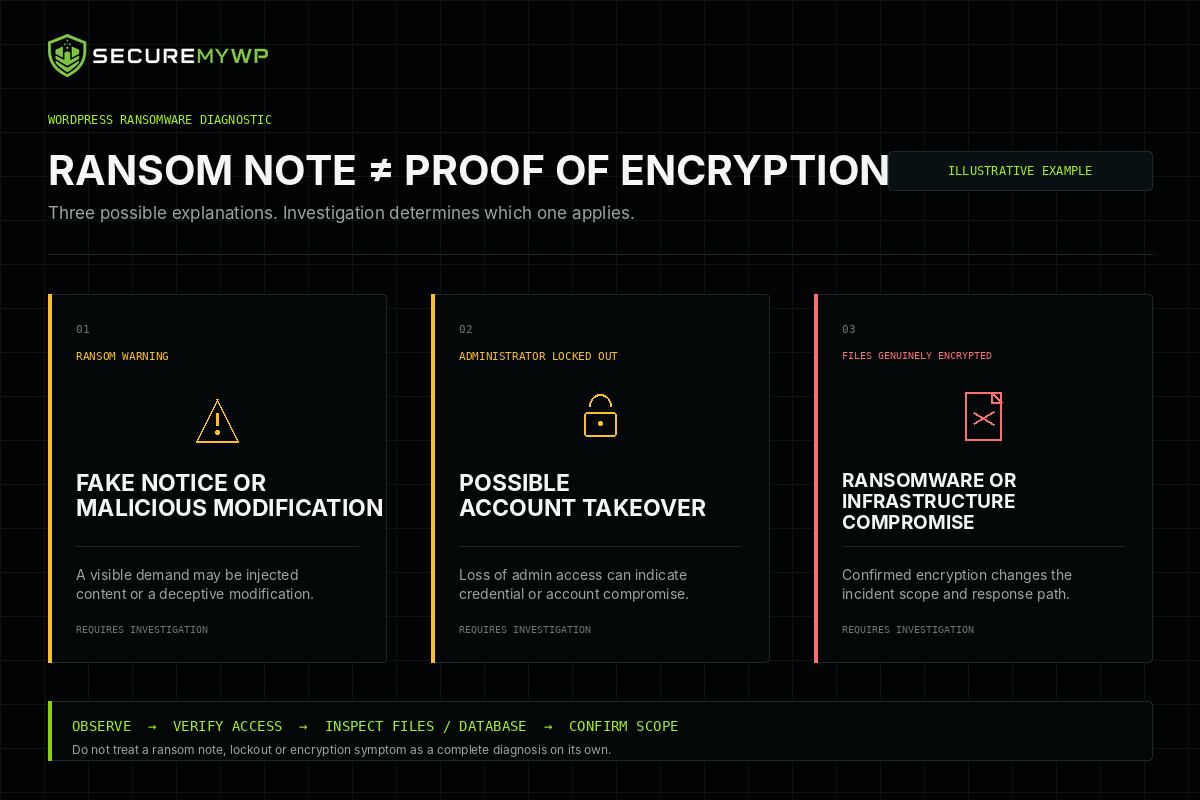
Before assuming that your website has suffered a ransomware encryption attack, consider what symptoms you are experiencing.
Different symptoms can point to different problems.
| What you notice | Possible explanation |
|---|---|
| Homepage displays a ransom demand | Fake ransomware notice, website defacement, or genuine compromise |
| WordPress dashboard rejects your password | Account takeover, authentication problem, or configuration issue |
| Posts and pages have disappeared | Database changes, unpublished content, deletion, or other compromise |
| Website files are unreadable | Possible encryption, corruption, or storage problems |
| Files have unfamiliar extensions | Possible encryption or other file modification |
| Hosting account is inaccessible | Hosting suspension, account compromise, or infrastructure incident |
| Website displays a security warning | Malware, phishing content, deceptive behaviour, or another security issue |
These are possible explanations, not definitive diagnoses.
For example, a changed filename does not independently prove encryption.
Similarly, an error message saying your website is encrypted does not establish that encryption has occurred.
A qualified investigation may involve examining file integrity, database records, hosting information, access logs, suspicious software changes, and available backups.
Does HTTPS mean my WordPress website is encrypted by ransomware?
No.
HTTPS encrypts information transmitted between a visitor's browser and a website.
That is a normal website security feature.
Ransomware encryption is different: it can make files or data inaccessible to their legitimate owner.
The HTTPS padlock in your browser is not an indication of ransomware.
Fake WordPress Ransomware: A Documented Real-World Example
In November 2021, website security company Sucuri investigated compromised WordPress websites displaying frightening ransom messages.
The attackers claimed that website files had been encrypted and demanded Bitcoin payments.
The affected websites appeared to have suffered serious damage.
However, Sucuri's investigation uncovered something important.
The websites examined had not actually been encrypted.
Instead, attackers had modified a WordPress plugin to display the fraudulent ransomware notice.
The malicious changes also altered the publication status of WordPress posts and pages.
As a result, content appeared to be missing or inaccessible even though it remained in the database.
Sucuri's researchers identified the malicious changes and investigated the affected website's recovery.
The incident demonstrated how attackers could create the appearance of ransomware without encrypting the website's files.
Why is this distinction important?
A website owner seeing a ransom demand may assume that paying the attacker is the only way to recover the website.
But if the underlying problem is malicious code, altered database records, or compromised administrator access, the appropriate recovery process may involve removing the malicious changes and restoring legitimate website functionality.
That does not mean every WordPress ransom note is fake.
Genuine ransomware affecting websites and servers has also been documented.
The lesson is that the actual technical condition of the website should be established before deciding how to recover it.
Can WordPress Websites Actually Be Encrypted by Ransomware?
Yes.
Although fake ransom notices are a documented threat, genuine file-encrypting ransomware affecting WordPress-related environments is technically possible.
For example, an archived NHS Digital security advisory published in May 2018 described a ransomware threat called Ransomnix.
The advisory documented ransomware exploiting vulnerable WordPress plugins to target web servers.
According to the advisory, the malware could encrypt server files, including database and configuration files.
This demonstrates that ransomware affecting WordPress infrastructure is not merely hypothetical.
However, historical examples should not be interpreted as evidence that file-encrypting ransomware is currently a common type of WordPress compromise.
There is also another distinction worth understanding.
A compromised WordPress website can sometimes be used to distribute malware to visitors.
In those situations, the WordPress website may serve as an attack platform while ransomware infects a visitor's computer.
That is not the same as the WordPress website itself being encrypted.
Why Is My WordPress Website Showing a Ransom Note?
A ransom note may appear after an attacker gains unauthorised access to part of your website or hosting environment.
Depending on the incident, the attacker may have:
- Modified WordPress files.
- Installed malicious code.
- Altered a plugin or theme.
- Changed database records.
- Replaced website content.
- Compromised administrator credentials.
- Accessed the hosting environment.
- Encrypted files or other accessible data.
Some attackers use ransom messages as intimidation rather than evidence of genuine encryption.
Others may combine encryption with threats to disclose stolen information.
It is important not to assume that every ransom demand represents the same attack.
The investigation should establish what systems were affected, whether files are actually encrypted, and whether unauthorised access remains possible.
What If a Hacker Has Locked You Out of WordPress?
Losing access to your WordPress dashboard can be frightening, particularly when the website generates business revenue.
However, a WordPress administrator lockout is not automatically ransomware.
An attacker may have changed your password, modified your administrator account, changed account permissions, or created an alternative administrator account.
There may also be legitimate causes, including authentication failures, plugin conflicts, or hosting problems.
If you cannot access your dashboard, contact your hosting provider and explain what happened.
Depending on the available access and technical circumstances, it may still be possible to investigate the installation through authorised hosting or database administration tools.
Do not install unfamiliar recovery software or make random database changes.
Incorrect changes can cause additional damage, particularly when the website's actual condition is not yet understood.
If an attacker appears to control your administrator account, treat the situation as a potential security incident even if no ransom demand has appeared.
What Should You Do Immediately If Your WordPress Website Is Held for Ransom?
1. Preserve evidence
Do not immediately delete the ransom note or suspicious files.
Record what you discovered, including the approximate time, affected website addresses, and any messages displayed.
Where safe, preserve screenshots and relevant information.
Your hosting provider or incident-response specialist may also be able to preserve server logs and a snapshot of the affected environment.
This evidence can help establish what happened.
2. Protect your visitors
If your website is displaying malicious content, exposing customer information, or potentially distributing malware, consider restricting public access while the incident is investigated.
The correct containment method depends on the affected systems and hosting arrangement.
If active ransomware is suspected at server level, involve the hosting provider or a qualified infrastructure-response specialist promptly.
Containment should prioritise preventing further damage while preserving evidence wherever practical.
3. Contact your hosting provider
Explain that you suspect your website has been compromised and that a ransom demand or possible encryption has appeared.
Ask whether the provider can help identify affected systems, preserve relevant evidence, and determine whether the hosting infrastructure is involved.
Your hosting provider may also have backup or snapshot facilities that can support investigation and recovery.
4. Protect available backups
If you have existing backups, ensure they are protected against unauthorised modification or deletion.
Do not overwrite potentially clean backups with copies of the compromised website.
An incident-response specialist may need to establish which backups are trustworthy and whether they predate the compromise.
5. Secure compromised access
Using a trusted device, review relevant administrative credentials and accounts.
Depending on the circumstances, this may involve WordPress administrator credentials, hosting access, SFTP or SSH accounts, and other connected services.
Credential changes should be coordinated with the investigation, particularly if attackers may still control parts of the environment.
6. Avoid destructive recovery attempts
Do not randomly delete suspicious files, overwrite databases, reinstall the entire server, or run unknown decryption utilities.
Some actions can destroy information needed for recovery or cause further data loss.
The appropriate technical response depends on whether the incident involves genuine encryption, a fake ransom warning, account takeover, or another form of compromise.
Should You Pay a WordPress Ransom Demand?
Paying a ransom is not recommended by established cybersecurity and law-enforcement authorities, including the FBI and the UK's National Cyber Security Centre.
There are several reasons.
Payment does not guarantee recovery.
Attackers may fail to provide working decryption information or may demand additional payments.
Payment does not establish that the website is secure.
Even if access is restored, malicious software, compromised credentials, or other unauthorised changes may remain.
Payment does not guarantee that stolen information will be deleted.
If attackers claim to possess customer or business information, payment cannot establish that they have destroyed every copy.
Some ransom demands are fraudulent.
As Sucuri's documented WordPress investigation demonstrates, attackers may claim files are encrypted when they are not.
Before making decisions based on an attacker's demands, seek appropriate incident-response advice.
For incidents involving serious financial loss, stolen information, or threats against a business, consider contacting relevant law enforcement and obtaining legal guidance.
Can WordPress Ransomware Be Removed Without Paying?
In some cases, yes.
However, recovery depends on what actually happened.
Scenario 1: Fake ransomware notice
If the website displays a fraudulent ransom message without genuine encryption, recovery may involve investigating and removing malicious changes.
Depending on the incident, legitimate website content or settings may also need to be restored.
The website must then be checked for remaining malicious access and unresolved vulnerabilities.
Scenario 2: Administrator account takeover
If the attacker has primarily taken control of administrator accounts, recovery may involve restoring authorised access and securing the affected credentials.
This should be accompanied by an investigation into whether malicious files or other unauthorised changes were introduced.
Scenario 3: Genuine encryption
When files or databases have genuinely been encrypted, removing the malicious software does not automatically decrypt the affected information.
Possible recovery options may include restoring verified clean backups or, in some cases, using a legitimate decryption tool that supports the identified ransomware variant.
Not every ransomware variant has an available decryptor.
If no usable backup, recovery method, or decryption capability exists, some information may be unrecoverable.
Scenario 4: Hosting-level compromise
If the underlying server, hosting account, or infrastructure has been compromised, recovery may require the hosting provider or a specialist infrastructure incident-response team.
Work could involve restoring server systems, investigating broader unauthorised access, repairing affected services, and recovering data where possible.
This is different from removing malware from a single WordPress installation.
Can You Restore an Encrypted WordPress Website From a Backup?
A trustworthy backup can be one of the most valuable recovery resources after a ransomware incident.
However, several factors matter.
The backup must contain the information required to restore the affected website.
It must also be accessible and sufficiently intact.
Most importantly, it should be assessed for signs of compromise.
Restoring a backup containing malicious code or the vulnerability used in the original attack may expose the website to another incident.
A backup may also predate recent orders, customer enquiries, website changes, or other business information.
This can create additional restoration decisions.
For business-critical websites, especially WooCommerce stores and membership platforms, recovery planning should account for potential data loss and the integrity of restored information.
A successful restoration is not just about getting the homepage working again.
It also requires reasonable confidence that the recovered website is safe to operate.
When Should You Get Professional WordPress Ransomware Recovery Assistance?
Professional assistance is especially appropriate when:
- A ransom demand appears on your website.
- You cannot determine whether files are encrypted.
- Your WordPress administrator account has been taken over.
- Posts, pages, products, or other content have disappeared unexpectedly.
- Your hosting provider reports suspicious activity.
- Multiple websites appear affected.
- You suspect customer information may have been exposed.
- Your website is essential to business operations.
- You cannot safely investigate the problem yourself.
The first objective should be understanding the incident.
A ransom note, administrator lockout, missing content, and genuine encryption may require substantially different recovery methods.
If you are uncertain about the cause, avoid assuming that purchasing a generic malware scanner or deleting visible malicious code will necessarily resolve the problem.
How SecureMyWP Can Help
SecureMyWP provides professional WordPress Incident Recovery for website owners experiencing suspected or confirmed compromises.
Our Standard Incident Recovery service is designed for one qualifying WordPress installation.
Subject to human scope review and written confirmation, the service ordinarily includes relevant WordPress-level investigation, remediation of identified malicious changes, appropriate security hardening, verification, and a written Incident Report.
Standard WordPress Incident Recovery: US$199 once-off.
No mandatory subscription is required.
However, the standard service is not an unconditional ransomware decryption or infrastructure-recovery service.
Genuine server-wide encryption, major data restoration, hosting-level compromise, or other unusually complex incidents may fall outside Standard Recovery.
Such situations require separate assessment and may require a specialist provider or a separately accepted quotation.
Before payment, SecureMyWP reviews the reported incident and confirms the proposed service scope.
WordPress Website Locked or Held for Ransom?
If your WordPress website is displaying suspicious ransom messages, has been taken over, or appears compromised, you can submit an enquiry for professional assessment.
SecureMyWP can review the reported symptoms and determine whether the incident falls within our supported WordPress recovery scope.
Get WordPress Recovery Help
Visit our Get Help page to submit your incident enquiry.
Do not include passwords, private keys, recovery codes, or other sensitive credentials in the public enquiry form.
Frequently Asked Questions
Can a WordPress website get ransomware?
Yes. Genuine ransomware affecting WordPress-related hosting environments has been documented.
However, not every ransom notice displayed on a WordPress website involves real encryption.
Does a ransom note mean my website files are encrypted?
No.
Attackers may display fraudulent ransom messages, hide content, or change website settings without encrypting files.
The underlying condition must be investigated.
What if a hacker changed my WordPress password?
A password change may indicate account takeover rather than ransomware.
You should investigate the access problem, secure relevant accounts, and check whether the attacker made other unauthorised changes.
Can I recover WordPress without paying the ransom?
Sometimes.
Recovery may be possible through removal of malicious changes, restoration of legitimate access, verified backups, or other appropriate technical methods.
The available options depend on the actual compromise.
Does removing ransomware decrypt my website?
Not necessarily.
Removing malicious software and decrypting previously encrypted files are separate technical tasks.
Is WordPress ransomware recovery included in SecureMyWP's $199 service?
A qualifying WordPress-level compromise may fall within SecureMyWP's Standard Incident Recovery scope.
However, genuine infrastructure-level ransomware, extensive encryption damage, and major data restoration are not automatically included.
Every incident is subject to human scope confirmation before payment.
Final Thoughts
Discovering that your WordPress website has been locked or is displaying a ransom demand is a serious warning sign.
But it does not automatically mean your website has been encrypted.
Some incidents involve genuine ransomware. Others involve fraudulent ransom notices, account takeovers, malicious website modifications, or broader hosting compromises.
The most important first step is to establish what actually happened.
Preserve useful evidence, protect your visitors, involve your hosting provider where necessary, and avoid destructive recovery attempts.
Once the nature and scope of the compromise are understood, appropriate recovery options can be evaluated.
If you need professional help investigating a suspected WordPress compromise, SecureMyWP offers human-led Incident Recovery for qualifying WordPress installations.
SecureMyWP - WordPress Security & Incident Recovery