
WORDPRESS SECURITY
WordPress Website Redirecting to Spam or Malicious Sites?
Is your WordPress website redirecting visitors to spam, scam, or suspicious websites? Learn why malicious redirects happen, why they may only affect certain visitors, and what steps to take to investigate and recover your site safely.
WordPress Website Redirecting to Spam or Malicious Sites?
If your WordPress website unexpectedly sends visitors to another website, it deserves investigation.
Malicious redirects can be introduced when a WordPress website is compromised, but not every redirect means your website has been hacked. Legitimate redirect rules, configuration mistakes, advertising or third-party integrations, and website migrations can also send visitors somewhere unexpected.
The warning signs become more serious when visitors are redirected to unrelated gambling, pharmaceutical, scam, phishing, advertising or other suspicious websites - particularly when the behaviour happens only on certain devices or when visitors arrive through Google.
One of the most confusing characteristics of malicious redirects is that your website may look completely normal when you check it yourself.
That does not necessarily mean the problem has disappeared.
Why Is My WordPress Website Redirecting to Another Site?
A WordPress website can redirect visitors for legitimate or malicious reasons.
Normal redirects are commonly used when a page has moved, a website changes domain, visitors log in, or old URLs are intentionally forwarded to new ones.
A suspicious redirect is different.
An attacker who gains access to a website may inject code or modify configuration so that some visitors are sent to unwanted destinations. Google documents hacked websites where redirect behaviour changes according to the visitor's referring website, user agent or device.
Unexpected behaviour can also result from a badly configured plugin, theme, server rule or third-party service.
For that reason, a redirect should be treated as something to investigate, rather than automatic proof that malware is present.
Signs Your WordPress Website May Have a Malicious Redirect
Common warning signs include:
- Visitors being sent to unrelated websites.
- Redirects to gambling, pharmaceutical, advertising, scam or suspicious download pages.
- Your website redirecting only on mobile devices.
- Redirects occurring after someone clicks your website in Google Search.
- Certain pages redirecting while other pages work normally.
- Customers reporting redirects that you cannot reproduce.
- Browser or search-engine security warnings associated with your website.
- Redirect behaviour beginning unexpectedly without an intentional website change.
These symptoms justify investigation, but they do not individually prove that your website has been compromised.
For example, a legitimate migration may intentionally redirect an old domain to a new one. An authentication system may send logged-out users to a login page. HTTPS enforcement may redirect an insecure URL to its secure equivalent.
The important questions are whether the destination is expected, whether you authorised the behaviour, and whether the redirect serves a legitimate purpose.
Why Does My Website Redirect Visitors but Work Normally for Me?
This is one of the most frustrating symptoms of a compromised WordPress website.
A customer tells you:
"Your website keeps sending me somewhere else."
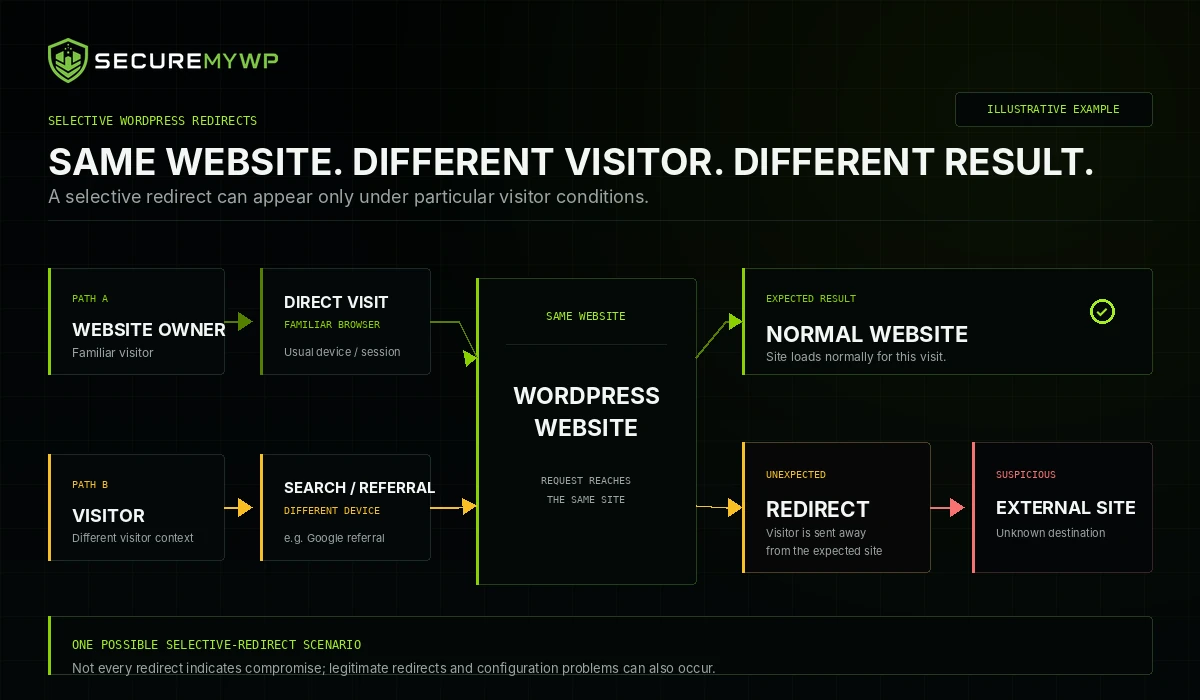
You open the same page.
Everything looks normal.
You refresh it several times.
Still normal.
That does not conclusively prove that the customer's report is wrong.
Device-dependent redirects
Malicious redirect logic can target particular devices.
For example, mobile visitors might be redirected while desktop visitors see the legitimate website.
Google specifically lists redirects that show desktop users a normal page while mobile users are sent to a different spam domain as an example of deceptive redirect behaviour.
Referrer-dependent redirects
The website may behave differently depending on how someone arrived.
A visitor clicking your result from Google may experience a redirect while someone typing the website address directly into their browser sees the normal page.
Google explicitly documents this behaviour in hacked websites.
Browser and visitor conditions
Redirect logic may also depend on characteristics of the request or visitor.
Depending on the implementation, factors such as browser information, previous visits, cookies or other conditions may influence whether the behaviour occurs.
The exact trigger must be determined through investigation rather than assumed.
Intermittent redirects
Some redirect behaviour may occur inconsistently.
That makes troubleshooting particularly difficult because a website can appear normal during one test and behave differently during another.
The practical lesson is important:
Seeing your homepage load normally once does not establish that your website is clean.
When customers repeatedly report suspicious behaviour, preserve the details of their reports and investigate the website under the conditions where the problem occurred.
What Causes Malicious Redirects in WordPress?
There is no single location where every malicious redirect lives.
Wordfence documents malicious redirects appearing in website files, JavaScript, WordPress content stored in the database and server redirect configuration.
Several potential causes should therefore be considered.
Compromised plugins or themes
If a plugin, theme or another component is exploited or modified without authorisation, malicious code can alter how visitors experience the website.
The compromised component may not necessarily be where the redirect itself is ultimately stored.
Injected JavaScript
JavaScript runs in visitors' browsers and can change page behaviour.
Attackers may inject malicious scripts into theme files, plugin files, other JavaScript resources, widgets, posts or pages.
Wordfence documents redirect infections involving both JavaScript files and scripts stored inside WordPress content.
Compromised database content
WordPress stores much of its website content and configuration in a database.
Malicious scripts or altered content can therefore exist in the database rather than as an obvious suspicious file on the server.
This is one reason simply scanning a few PHP files may not reveal the full problem.
Server configuration changes
Redirects can occur before WordPress itself processes the request.
On compatible Apache-based hosting environments, the .htaccess file can contain redirect instructions. Wordfence documents compromised .htaccess rules that react to browser, device or referring-site information.
Other web-server configurations may implement redirects differently, so .htaccess should not be treated as a universal WordPress configuration file.
Editing server configuration without understanding it can also break a website.
Persistent malicious access
Even after a visible redirect is removed, unresolved access may allow malicious behaviour to return.
Possible causes include compromised credentials, vulnerable website components or malicious persistence mechanisms.
A proper investigation should establish what actually happened rather than assume that every compromised website follows the same pattern.
What Should You Do If Your WordPress Website Is Redirecting Visitors?
1. Document the behaviour
Record what you know before making major changes.
Useful information includes:
- The affected URL.
- The approximate date and time.
- The visitor's device type.
- The browser being used.
- Whether the visitor arrived through Google or another website.
- Which page appeared before the redirect.
- Screenshots of warnings or unexpected behaviour where they can be captured safely.
Do not ask customers to send passwords, hosting credentials or other sensitive information.
Official WordPress hacked-site guidance similarly recommends documenting symptoms and relevant timing early in the response process.
2. Preserve the current state
Where practical, preserve a backup or hosting snapshot before making significant modifications.
Even a compromised copy can provide useful information when investigating what changed.
WordPress recommends retaining a snapshot before cleanup, and Wordfence recommends backing up website files before modifying files or databases.
Do not assume that a newly created backup is clean.
3. Protect visitors if necessary
If the website is confirmed or strongly suspected to be sending visitors to harmful destinations, temporary containment may be appropriate.
The correct action depends on your hosting environment and the role the website performs.
An online store or customer portal may require different handling from a simple informational website.
Avoid randomly deleting website files in an attempt to make the symptom disappear.
4. Contact your hosting provider
Your hosting provider may have access to information that is not visible inside WordPress.
Ask whether they can identify suspicious server activity, altered configuration, recent file changes, security alerts or available backups.
WordPress's own hacked-site guidance recommends involving the hosting provider because an incident may extend beyond the WordPress installation itself.
5. Check Google Search Console
Open the Security Issues report for your verified website.
Google uses this report to surface findings such as hacked content, malware and other behaviour that may harm visitors.
A reported issue should be investigated across the website rather than assuming the example URLs are the only affected pages.
Google notes that the URLs shown in the report are samples and may not represent every affected page.
A clean Search Console report is useful information, but it should not be treated as conclusive proof that no compromise exists.
6. Review website access and components
Investigate:
- Administrator accounts.
- Recently installed or modified plugins.
- Themes.
- WordPress core integrity.
- Unexpected file changes.
- Relevant database content.
- Hosting and access logs where available.
- Recent configuration changes.
If you discover an administrator you do not recognise or another obvious unauthorised change, treat it as part of the broader incident rather than an isolated problem.
7. Address the underlying cause
Removing the redirect itself is not enough if the mechanism that introduced it remains present.
The investigation should attempt to determine:
What changed?
How was it changed?
Does the attacker still have access?
Are other malicious changes present?
Is a vulnerable component still exposed?
Our broader guide, My WordPress Website Has Been Hacked — What Should I Do?, explains the wider incident-recovery process.
8. Verify the recovery
After remediation, test the website under the conditions where the redirect was originally reported.
Where relevant, verify behaviour across desktop and mobile environments and consider whether the original report involved a search-engine referral.
Also continue monitoring the website for recurrence.
Do not deliberately browse known malicious destinations simply to confirm that they remain malicious. Google warns that directly opening infected pages can expose the device being used for testing.
Why Removing the Redirect May Not Fix the Problem
There is an important difference between:
removing the visible symptom
and
remediating the underlying compromise.
Suppose malicious JavaScript is removed from one page.
That may stop one redirect.
But if the attacker still has access, another malicious component remains, or the original vulnerability is still exposed, the incident may not be resolved.
Likewise, a redirect discovered in server configuration may only be one part of a broader compromise.
Incomplete cleanup can leave:
- Remaining malicious content.
- Unauthorised access.
- Vulnerable components.
- Persistence mechanisms.
- Other affected pages.
- Continued exposure for visitors.
- Search-engine security issues.
This does not mean that every redirect infection contains a hidden backdoor, nor does it mean reinfection is inevitable.
It means that the cause should be investigated instead of assuming the first visible symptom is the entire incident.
WordPress Website Redirecting Visitors?
SecureMyWP provides professional WordPress Incident Recovery for website owners dealing with suspected compromises and malicious website behaviour.
Incident Recovery focuses on investigating the problem, addressing malicious website changes and helping identify the security issues associated with the incident — rather than simply hiding the visible redirect.
Standard WordPress Incident Recovery: $199
You can also learn more about WordPress Incident Recovery.
Can Malicious Redirects Affect Google Rankings or Website Trust?
Yes, a compromised website can affect both visitor trust and search visibility.
Google classifies unauthorised content placed through website security weaknesses as hacked content. Its policies specifically identify redirects that send some users to harmful or spammy pages as a form of hacked content.
Google states that sites violating its spam policies may rank lower or may not appear in search results.
Separately, websites affected by certain security issues can receive warning labels in Google results or browser warning pages intended to protect visitors.
If Search Console reports a security issue:
- Investigate the issue.
- Fix it across the affected website.
- Test the remediation.
- Request a review when all reported issues have been resolved.
Google states that security reviews can take from several days to several weeks in some cases.
Cleaning the website does not guarantee that previous search rankings will immediately return, and no legitimate recovery provider can promise Google's approval or a specific search-ranking outcome.
When Should You Get Professional WordPress Malware Removal?
Professional assistance may be appropriate when:
- You cannot locate the source of the redirect.
- The redirect disappears and repeatedly returns.
- Customers experience behaviour you cannot reproduce.
- Several WordPress components appear to have been changed.
- Server configuration may be involved.
- You suspect administrator or hosting access has been compromised.
- The website processes transactions or sensitive information.
- You are not comfortable safely investigating files, databases, logs or server configuration.
Malicious redirects can cross several layers of a WordPress environment.
The technically correct response is therefore not always "find the redirect code and delete it."
The objective is to determine what happened, remove unauthorised changes, address the relevant security weakness and verify that the website behaves normally afterwards.
WordPress Website Redirecting to Spam or Malicious Sites?
If customers are reporting suspicious redirects, do not dismiss the reports simply because the website looks normal on your device.
Document what is happening, preserve useful evidence, protect visitors where necessary and investigate the website systematically.
A selective redirect can be difficult to reproduce, and removing one obvious symptom may not resolve the entire compromise.
SecureMyWP provides professional WordPress Incident Recovery for website owners who need help investigating suspected malicious website behaviour.
Standard WordPress Incident Recovery: $199
SecureMyWP - WordPress Security & Incident Recovery